#html-body [data-pb-style=MRGF0HV]{justify-content:flex-start;display:flex;flex-direction:column;background-position:left top;background-size:cover;background-repeat:no-repeat;background-attachment:scroll}Use in One Location or On the GoStarlink service plans support one location or on the go use. Starlink installation can be customized for permanent, fixed install using Starlink official mounts and accessories available for purchase in the Starlink app.
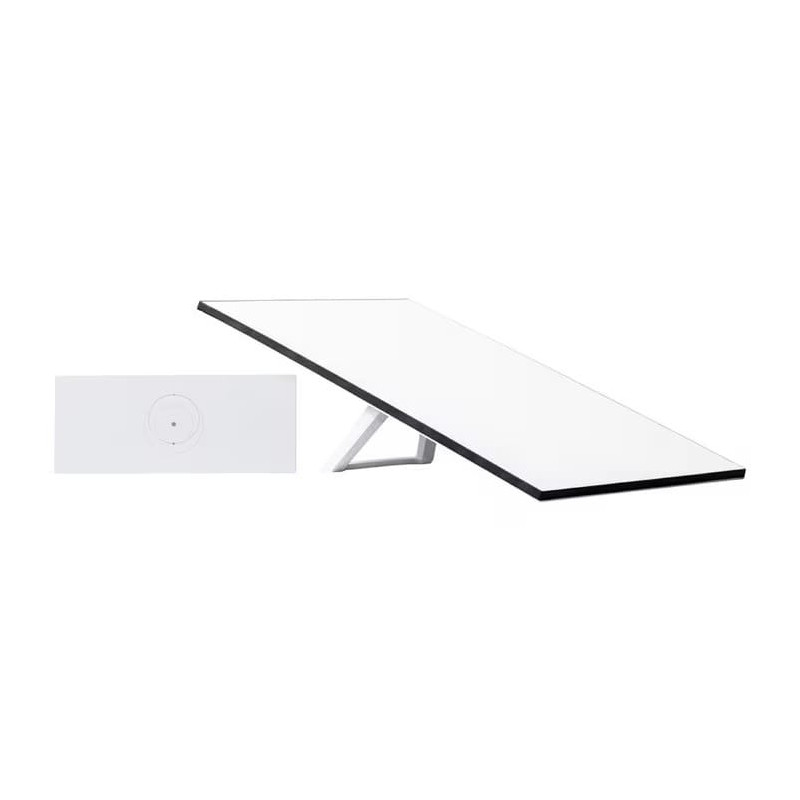
Get Online in MinutesSet up Starlink with just two steps. Plug it in and point at the sky. Starlink comes with everything needed to get online including a kickstand, Gen 3 Router with 2 ethernet ports, cables and power supply.
Steam Movies, Make Video Calls, Game & MoreWith Starlink, users can engage in activities that historically have not been possible with satellite internet.
Service Plan RequiredActivate Starlink by selecting a service plan that is customized to meet your personal needs. Select from plans suited for households or travel.
No ContractsPause and un-pause service at any time.
Requires a Clear View of the SkyStarlink requires a clear view of the sky to connect to satellites.
GEN 3 Wi-Fi RouterThe Starlink Standard comes with a Gen 3 Router which boasts 2 ethernet ports, Wi-Fi 6, a range of up to 297 m2, and the ability to connect up to 235 devices.
Weather ResistantDesigned to endure the elements - it can melt snow and withstand sleet, heavy rain, and harsh winds.
Download the Starlink AppFind an unobstructed view of the sky, determine the best install location, explore mounts and accessories, and manage your account--all in the Starlink App.